UCC Core Scheduling
These shared spaces within the University Capitol Centre (UCC) are managed by the Office of the Provost and are available to be reserved by UI Faculty and Staff:
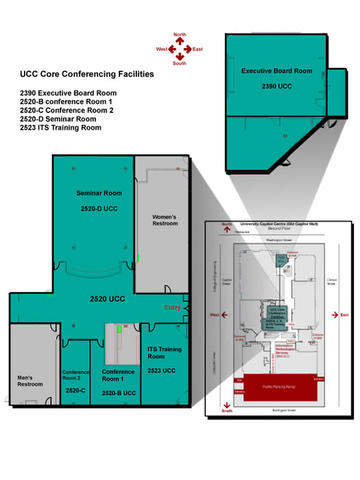
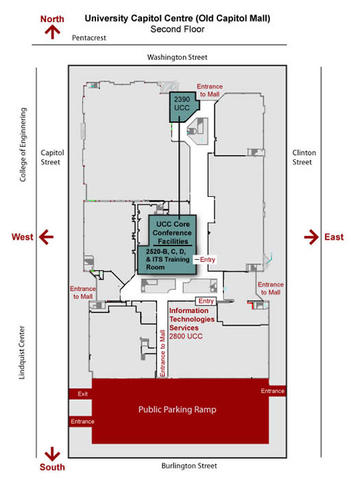
- UCC Conference Center (2523, 2520D, 2520B, 2520C)
- UCC Executive Boardroom (2390)
- The CoWork Commons (2070/2080) is also available for all UI employees and includes conference rooms for larger group meetings.
Please Note: Registered Student Organizations should reserve Iowa Memorial Union meeting spaces for their event needs. If the IMU has no availability for your requested date and time you may be able to reserve UCC spaces. Please contact the IMU Event Services team (imu-eventservices@uiowa.edu) if you are unable to reserve the space you need.
Use of Shared Spaces
UCC Shared Spaces are self-service. You are responsible for tidying up the space when you are done. Cleaners are provided in the rooms for wiping surfaces. If you move furniture, please return it to its original configuration. For meetings or events that involve food, take out the trash and place it by the bin for the custodial pickup.
For detailed information about UCC spaces managed by the Office of the Provost, please visit their webpage on this topic.
Scheduling the UCC Core Facilities
UCC Core Facilities scheduling is through Outlook. Customers can reserve rooms, if available, through their Outlook calendar by inviting the room(s) to the meeting. Do not schedule directly onto the conference room calender.
Searching and Reserving a Conference Room in Outlook (Desktop):
- Click into "New Appointment" in the top menu bar.
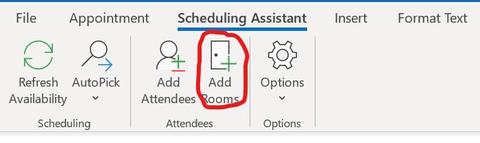
- Go to "Scheduling Assistant" tab.
- Select "Add Rooms."
- Search by the name of the conference room. (See listings below for the room names).
- Highlight the room and and click Rooms, then OK
- Review availability. If available, click Send to reserve. If not, select a different room or time.
Searching and Reserving a Conference Room in Outlook on the Web:
- Click "New event" in the top menu bar.
- Go to "Scheduling Assistant" tab.
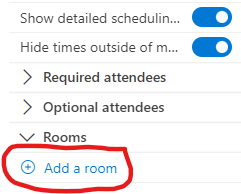
- Select "Rooms" then "Add a room."
- Choose "Browse with room finder" and search by room name. See listings below for the room names.
Reservations may require approval. A confirmation email will be sent once the reservation is approved.
Technical Support
Technical Support is provided by its-helpdesk@uiowa.edu
If technical problems arise in UCC conference spaces, call 319-335-1976 (Classroom Technology Services hotline). Support is available during normal business hours (8:00 a.m.-5:00 p.m., Monday - Friday).
Maps
Overview
There is no charge for use of this service.