ChatGPT Edu is an AI-powered assistant available to faculty and staff. It helps streamline everyday tasks such as creating project plans, drafting documentation, writing emails, and preparing meeting content. The University of Iowa's ChatGPT Edu workspace has enterprise data protection. Visit our AI Tools page to learn more about the types of data that can be used with this tool.

This support article outlines:
  • Key features on ChatGPT Edu
  • Frequently Asked Questions on ChatGPT Edu include:
    • Privacy and Data Protection with ChatGPT Edu
    • How to Login to ChatGPT Edu via the Web Portal
    • Overview and Highlights of ChatGPT Edu Interface

Live training on how to use ChatGPT Edu is available here. 

Key Features on ChatGPT Edu
  • Advanced Tools
    • Data analysis, web browsing, and file uploads

    • The ability to build GPTs, custom versions of ChatGPT, and share them within university workspaces

    • Substantially higher message limits than ChatGPT Free

    • Improved language capabilities across quality and speed, with over 50 languages supported
Do I have data protection with ChatGPT Edu?

Yes. You own and control your data within the University of Iowa ChatGPT Enterprise. OpenAI does not train on your data or conversations, and their models don’t learn from your usage. 

ChatGPT Edu allows for Public and University-Internal data. Restricted-Critical is permitted for use with consultation from research services or ITS-ISPO.

ChatGPT is currently not HIPAA compliant and is not approved for use with patient data. Please contact the Joint Office for Compliance with any questions at 319-384-8282 or compliance@uiowa.edu.

How do I login into my ChatGPT Edu account?

How To Login:
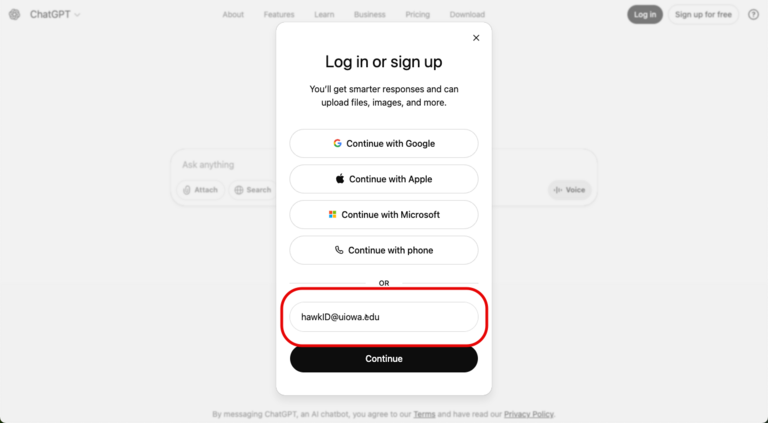
  1. Navigate to https://chatgpt.com/ in a browser.
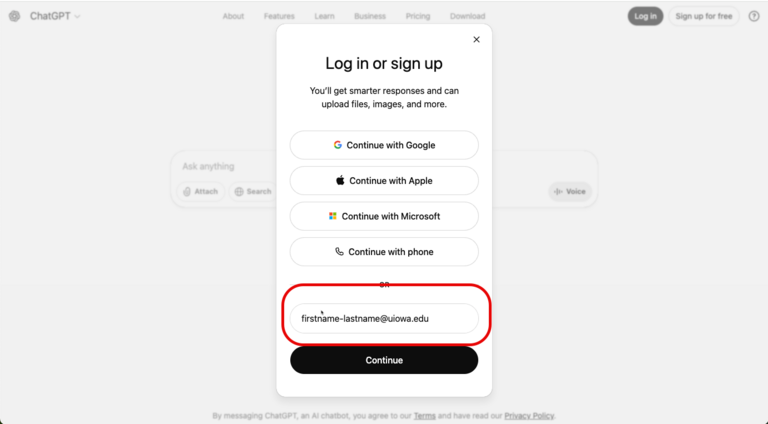
  2. To login into your ChatGPT Edu account, you must use your hawkID@uiowa.edu (ex: jdoe@uiowa.edu). 
Screenshot of hawkID in ChatGPT Edu login

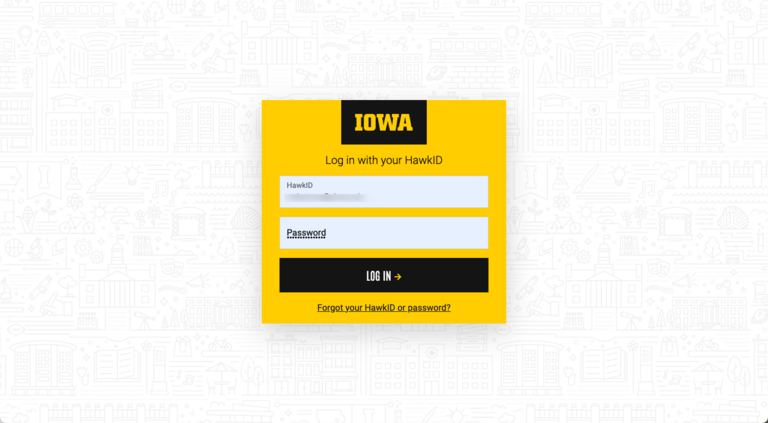
3. You will then be prompted through SSO authentication. Enter your hawkID and password.

SSO for ChatGPT Edu

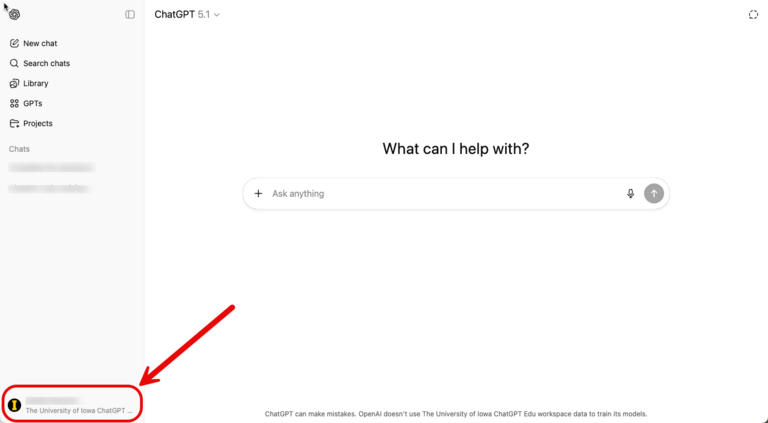
4. Once in, ensure you are on the University of Iowa ChatGPT Edu workspace account by locating the UI logo on the bottom left side of your interface. 

Screenshot of ChatGPT Edu interface with UI Logo


Note: If you signed up with your hawkID@uiowa.edu initially before this service, you will be forced to merge or export your data.

How To Login in With An Existing Account:

If you used your email alias of firstname-lastname@uiowa.edu (ex: jane-doe@uiowa.edu), you can still keep this account and you will not be able to merge your data with your University of Iowa ChatGPT Edu workspace account. 

Note: if you know longer wish to keep your existing account (paid or free), you must work with the vendor to cancel it. It will not be automatically cancelled.

  1. Login with your firstname-lastname@uiowa.edu (ex: jane-doe@uiowa.edu). 
Screenshot of ChatGPT Edu Personal Account Login

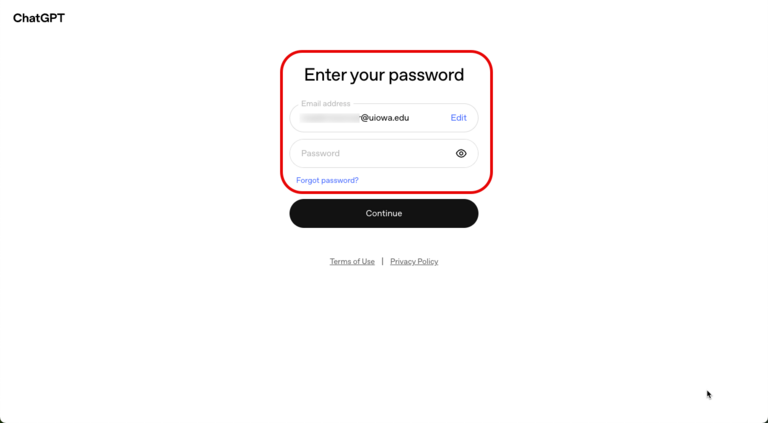
2. You will need to enter your original password used for that account and will not see SSO authentication. This account will not have enterprise data protection and is not affiliated with the University of Iowa ChatGPT Edu workspace.

Screenshot of ChatGPT Edu Interface Personal

What is a Custom GPT in ChatGPT Edu?

A Custom GPT is a personalized version of ChatGPT Edu designed to help with specific tasks or questions by following instructions and using information you choose. It’s essentially a focused AI assistant.

A Custom GPT is similar to an agent in Microsoft Copilot, allowing you to define how it behaves, what it helps with, and what information it uses. It provides a reusable assistant for specific needs instead of starting from a blank chat each time. 

In ChatGPT Edu, they can support university tasks such as:

  • Answering common questions
  • Summarizing policies
  • Drafting routine communications
  • Assisting with onboarding or training
  • Guiding users through multi-step tasks using approved information

While useful, Custom GPTs are still AI tools, so users must review and apply judgment to all outputs. 

All content used in or shared through a custom GPT must follow University of Iowa data classification expectations. Custom GPTs should only include or be pointed towards data classified as University Public or University Internal. For more information on the criteria that make information public or internal, visit the University of Iowa Data classification guidelines and Institutional Data Policy web pages.

Note: Custom GPTs must not include restricted or sensitive data, such as personal data, protected health information, student records, or other data classified above University Internal, unless explicit approval has been granted through appropriate university processes. These requirements apply regardless of whether a GPT is shared internally or externally. 

Can I share a Custom GPT in ChatGPT Edu?

Yes. You are able to share a Custom GPT both internally and externally. 

Internal sharing 

Sharing within the university workspace ensures that access is limited to authenticated university users and is generally the safest option for tools intended for internal audiences. You can choose to share with specific people that you identify, or anyone at the university who has the link.

External sharing (“Anyone with the link”) 

Selecting “anyone with the link” allows access by anyone who obtains the link, including individuals outside the university. When this option is used, you lose control over who can access the GPT and how it may be used or shared further.

Because of this, Custom GPTs shared externally should be reviewed carefully to ensure they contain only University Public or University Internal data and do not expose internal processes or information beyond their intended scope. Custom GPTs should only be shared with others that also have permission to access to the data contained within them. Users are responsible for ensuring that confidential data is not shared inappropriately outside of the university.

Always choose the most restrictive sharing option that meets your needs. 

How does ChatGPT Edu compare to other ChatGPT services?

ChatGPT capabilities as per different subscription:

Note: these capabilities change frequently and may not be up-to-date. Please refer to this page: https://chatgpt.com/pricing

Feature / Capability 
ChatGPT 
ChatGPT Plus 
ChatGPT Pro 
ChatGPT Edu 
Enterprise License 

Cost 

Free 

$20 per month per user 

$200 per month per user 

$156 per user per year 

Data Used for Model Training? 

Yes (opt-out available) 

Yes (opt-out available) 

Yes (opt-out available) 

No; Enterprise data protections apply 

Integration with University Systems 

Not Available 

Not Available 

Not Available 

Not Available–potential future integration 

Usage Limits 

Basic limits 

Higher limits 

Highest limits 

Unlimited 

Model Access 

(Number of queries increases as you sign up for more expensive consumer models; Iowa Edu account is unlimited 5.1 and 4o access) 


  • Access: GPT-5.2, GPT-5.2 thinking/mini

  • Expanded access: GPT-5.2, GPT-5.2 thinking/mini

  • Standard access: GPT-4o, GPT-4.1, OpenAI o3

  • Unlimited access: GPT-o4-mini 

  • Unlimited access: GPT-5.2, GPT-5.2 thinking/pro/mini, GPT-4o, GPT-4.1, GPT-4.5, OpenAI o3, o4-mini

  • Unlimited access: GPT-5.2, GPT-4o

Response Time 

Slower Response Times, with Priority Given to Other Account Types 

Fast 

Fast 

Fast 

Custom GPTs 

Available (use only, basic access) 

Available (create & use) 

Available (create & use) 

Available

Memory 

Available 

Available 

Available 

Available 

Canvas 

Available 

Available 

Available 

Available 

File Uploads 

Available (limited) 

Available 

Available 

Available 

Data Analysis 

Available (limited) 

Available 

Available 

Available 

Image Generation  

Available (limited) 

Available 

Available 

Not available 

Voice Mode 

Available (limited) 

Available (standard and advanced) 

Available (unlimited) 

Not available 

Web Search 

Available 

Available 

Available 

Available 

Sora Video Generation 

Not Available 

Available (limited) 

Available (extended access) 

Not available 

Projects & Tasks 

Not Available 

Available 

Available 

Available 

Study Mode 

Available 

Available 

Available 

Available 

What features are not available on ChatGPT Edu?

Features not currently available on University of Iowa ChatGPT Edu include: image generation, Deep Research, Agent Mode, Voice and Codex. 

We plan to implement new features as we continue testing.

How do I know if ChatGPT Edu is right for me?

Please refer to our AI Tool Comparison Chart, which highlights all University of Iowa Enterprise AI tools currently available on campus, including their features and comparisons. 

Additionally, check out our role-based guide to help you choose the right tool for your needs.

Is there any training offered for ChatGPT Edu?

Yes! Live training on how to use ChatGPT Edu is available here.

Last updated
Article number
10946