Claude for Education provides an AI assistant for everyday work such as project planning, document preparation, coding assistance, writing emails, and meeting materials. It is available to University of Iowa faculty and staff.

UI users receive enterprise data protection through the university-managed workspace. Visit our AI Tools page for university guidance on appropriate data use. 

Claude for Education is not approved for use with patient data or other data requiring HIPAA compliance. A separate HIPAA-ready Claude workspace, designed with additional protections for certain sensitive data, is expected to launch in the first quarter of 2027. Please contact the Joint Office for Compliance with any questions at 319-384-8282 or compliance@uiowa.edu.

Key features of Claude for Education

  • Assistance with writing, summarizing, brainstorming, and reviewing information
  • File uploads for working with approved documents
  • Projects for organizing conversations, reference materials, and instructions
  • Standard and Premium licenses with different usage allowances
  • Claude Code access

Note: Claude Chat and Claude Cowork soon will be brought together into a unified Claude experience. As this transition occurs, the names and locations of these features within Claude may change.
Do I have data protection with Claude for Education?

Yes. You own and control your data within the UI Claude for Education workspace. By default, your data or conversations are not used to train its AI models. Information you explicitly submit as feedback or otherwise authorize for model improvement may be treated differently. For more information, see this data training guidance.

Be sure that you understand data classifications, protect sensitive information, and follow university privacy requirements when using AI. Claude for Education can be used with data classified as public and university internal. Restricted-Critical data is permitted for use with consultation from the Information Technology research services team or the Information Security and Policy Office.

Claude for Education is not approved for use with patient data or other data requiring HIPAA compliance. Protected health information (PHI) must not be entered into this service. A separate HIPAA-ready Claude workspace, designed with additional protections for certain sensitive data, is expected to launch in the first quarter of 2027. Please contact the Joint Office for Compliance with any questions at 319-384-8282 or compliance@uiowa.edu.

Who can receive a Claude for Education license?

Claude for Education is available to UI faculty and staff. A license purchase and department IT approval are required.

Individual student licenses are not supported at this time. Student access through faculty-requested class groups may be available in the future.

How do I request a license?

To receive a license for Claude for Education:

  1. Connect with your supervisor.
  2. If your supervisor approves, you can reach out to your department’s IT lead to request the license.
  3. Submit the AI Tool License Request in UI Workflow, select Claude, choose standard or premium, and provide the MFK.

Approval from your supervisor and department IT leader is required.

Once approved and provisioned, you will receive a welcome email inviting you to join the UI workspace on Claude.

Access is usually available within a few hours after approval. If you have not received access after that time, contact the ITS Help Desk.

What is the difference between standard and premium?

Standard is recommended for most everyday university work. Premium provides a higher usage allowance.

FeatureStandardPremium
Cost$20 per user per month$55 per user per month
Recommended useEveryday work tasksHeavy daily use
Usage allowanceStandard allowanceFive times standard allowance
Claude CodeIncludedIncluded
Claude CoworkIncludedIncluded
Claude DesignIncluded Included

Your department is charged using the MFK provided on the license request.

If you frequently reach your standard usage limit, contact your IT lead to discuss a premium license.

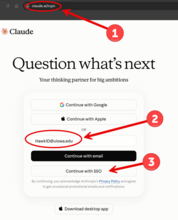
How do I log in to my Claude for Education account?

  1. Open Claude in your browser.
  2. Sign in using your HawkID@uiowa.edu email address. Replace HawkID with your own HawkID.

    Claude Sign In
  3. When prompted for Continue with SSO, select that and enter your HawkID and password.
  4. Confirm that you are in the University of Iowa workspace before entering university information.

Note: If you have an existing personal Claude account, you may need to select the UI organization from the account menu.

What models are available with Claude for Education?

The UI Claude for Education workspace currently provides access to the latest versions of Claude Opus, Sonnet, and Haiku.

Additional models may be enabled for specific groups in the future, subject to ITS review and may require additional charges.

Why can’t I sign up for a personal Claude account with my university email address?

The University of Iowa has an enterprise agreement with Anthropic, and new personal Claude sign-ups using university email addresses are no longer available.

For university work, request a Claude for Education license through the AI Tool License Request form. For personal use, create an account with a personal email address.

What happens to my existing personal account with a university email address?

Starting Dec. 1, University of Iowa single sign-on (SSO) will be required. You will no longer be able to access these personal accounts using your university email address. Please export any personal account content you need before Dec. 1.

Existing personal Claude accounts that use a university email address will continue to work until Dec. 1, 2026.

Personal accounts are separate from the UI Claude for Education workspace and are not approved for university data.

For university work, request a Claude for Education license and select the University of Iowa workspace after signing in.

What is a Project in Claude for Education?

A Project is a workspace where you can organize related conversations, upload reference documents, and provide instructions for an ongoing task.

Projects can support university work such as:

  • Developing teaching or training materials
  • Drafting departmental documentation
  • Summarizing reference materials
  • Preparing communications for a particular audience

Review and apply your judgment to all AI-generated content before using or sharing it.

All information used in a Project must follow University of Iowa data classification requirements. These requirements apply to uploaded files, instructions, and conversations.

For more information, see Anthropic’s Projects guide.

What features are available in Claude for Education?

Claude for Education includes features to support writing, document review, and other university work. Feature availability may change as new capabilities are reviewed and enabled.

Available with standard and premium licenses:

  • Conversations
  • File uploads
  • Projects
  • Claude Code
  • Approved connectors, including Atlassian, GitLab, Slack, Smartsheet, and Trello. Access may vary by group.

Available with a premium license:

  • A higher usage allowance

Subject to university approval and configuration

  • Additional connectors to external services must be evaluated and approved for specific groups on a case-by-case basis.
  • New features introduced by Anthropic are also subject to university review before being enabled.

For questions about features currently available in the University of Iowa workspace, contact the ITS Help Desk.

What happens if I reach my usage limit?

Each license includes a usage allowance. Open Settings → Usage to view your usage and reset time.

If you reach your limit, you will need to wait until the allowance resets. If this happens frequently, contact your supervisor and IT lead to discuss moving to premium.

How long are Claude for Education conversations saved?

Beginning Nov. 1, 2026, an 180-day retention period will apply to content stored in Claude, including Claude Chat, Claude Code, and Cowork.

This means that any content that is more than 180 days old will no longer be available in Claude. We encourage you to export any chats, artifacts, designs, or other Claude content you want to retain beyond the retention period.

Where can I get help or training?

For support, contact the ITS Help Desk.

For training, explore Anthropic’s self-paced learning resources:

Note: These materials may include features that are not available in the UI Claude for Education workspace. Some capabilities, including connectors to external services, require ITS review and approval for specific groups.

Last updated
Article number
13731