- Download the University of Iowa Mobile App on your device and log in with your HawkID.
- Open the UI Mobile App and select menu in the bottom right corner and scroll until you see the section labeled Opt-In Channels. Select Free Food Message Form (this will open another view that has the terms and conditions).

- Review and select ‘I agree’. (This will open the submission form.)

- The submission form has several required fields to fill out.
- Building: enter the full building name followed by the building acronym in parentheses.
- Room Number: Enter the Room Number the food is available in.
- Leftover Food Details: Type a brief description of the food that is available. Include things like quantity and type of food. It may be helpful to include the company/caterer that provided the food or if any of the food is vegan or gluten-free.

- Add any additional information in the Notes (Optional) section.
- In the Sent Time (Central) Section, add time in the Hour and Minute field for the time that the post should be sent.
- Select AM or PM in the button below. The post will be visible for 30 minutes after posting.
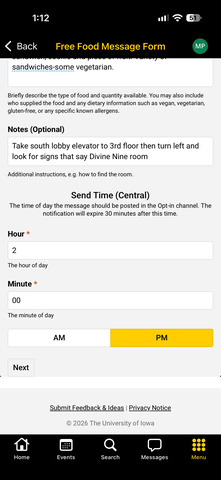
- Once you’ve completed all of the form fields, click next at the bottom of the screen.
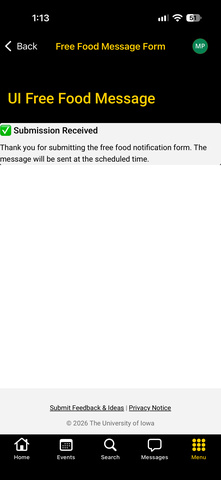
- The app will display a preview of your message, review the message for accuracy. If you’d like to make changes, click cancel to return to the previous screen. If the message looks good and you’re ready to schedule the post, click submit. You’ll see a message on the screen that says 'Submission received’.