The University of Iowa Mobile App helps students stay informed by delivering personalized messages directly to their phones. This ensures important information isn't missed among the many daily emails students receive.
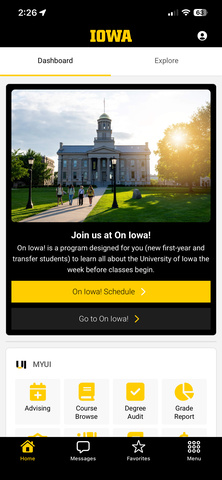
In-App Messaging Categories
The app categorizes messages into four main types, each tailored to different needs and audiences:
- The promotion of campus news or an upcoming activity that directly ties to student success.
- The promotion of a campus resource or service.
- A required task related to students' academic success.
- Campuswide impact on health, safety, or a change to campus operations.
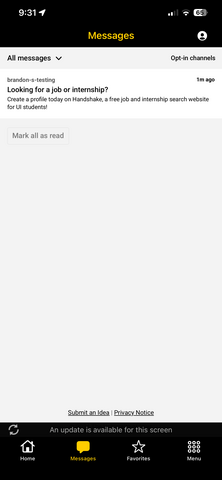
Communication Methods
Users can be alerted to new messages through different notification methods, ensuring important information reaches them efficiently. The app uses the following methods to deliver messages:
- Unread Message Badges: Displayed on the app icon and within the Message Center tab.
- In-App Banners: Contextual alerts based on message urgency.
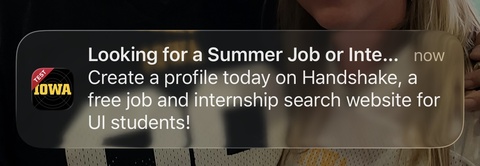
- Push Notifications: Real-time alerts directing users to messages or designated URLs.
Approval Process Outline
To maintain the quality and relevance of messages sent through the app, all submissions must follow an approval process:
- Submission: Messages should be submitted at least three weeks in advance.
- Review: The UI Mobile App Leadership Team will review the message for relevance, accuracy, and appropriateness.
- Approval: Approved messages will be scheduled for delivery through the appropriate channels.
- Notification: You will be notified of the approval status and the scheduled delivery date.
Submit a Message for Consideration
If you have a message that you believe should be sent to students via the University of Iowa Mobile App, please submit it for consideration. Follow these steps:
- Prepare Your Message: Ensure your message is clear, concise, and relevant to the target audience.
- Submit Your Message: Submit your message through Universal WorkFlow.
- Approval Process: Your message will go through an approval process to ensure it meets the guidelines and is appropriate for the intended audience.
Message Configuration
- Title: Displayed in the Message Center, push notifications, etc. (limit 75 characters).
- Body: The main content, which supports HTML formatting (limit 120 characters).
- Link: Redirects users to an external website or internal app screen.
- Title: The label for the link (limit 75 characters).
- URL: The destination to a mobile app screen.
- Image: JPEG/PNG format, with a minimum width of 800px and a max file size of 2MB.
- Alt text: Required for accessibility when an image is included.