Call Queues are departmental lines in which employees can make and take calls on behalf of the number owned by a department rather than an individual's personal line.
What is a Call Queue?
What is a Call Queue?
A Call Queue is a feature that lets managers or server administrators route and queue incoming calls to groups of people, called agents, such as for a help desk or a customer service desk. When incoming calls are routed to a queue, and you are signed in as an agent of said queue, you'll be alerted to the call via Teams.
Who is eligible to be an agent in a Call Queue?
Who is eligible to be an agent in a Call Queue?
To make and/or receive call queue calls, you must be provisioned with Teams Phone Enterprise Voice. Eligible HR Codes for Enterprise Voice are 100100 (Current Employee), 100110 (Future Employee),100210 (Emeritus Faculty), 100220 (Emeritus Staff), 100400 (Current Student Employee) and 100600 (HR Affiliate)
Any employee's HR coded not set as 100400 MUST have full-service in order to participate. The cost is $17.50 per month + any long-distance charges. Employees coded 100400 can be given specific licenses that will allow them to make calls within the university directory and the ability to make and take calls on behalf of the call queue.
How do I answer Call Queue calls?
How do I answer Call Queue calls?
Opting into a Call Queue
If you are going to take calls as a call queue agent, you first need to sign in to that queue (unless the queue is set up to automatically have you opted in when you're signed into Teams). To opt into a queue, navigate to the settings menu in Teams. Then select the Calls menu. From there you will see your personal call settings and you should see additional tabs for queues your an agent of. Select the tab that matches your queue and make sure you you have your toggle to on under "Turn on to start receiving calls" :
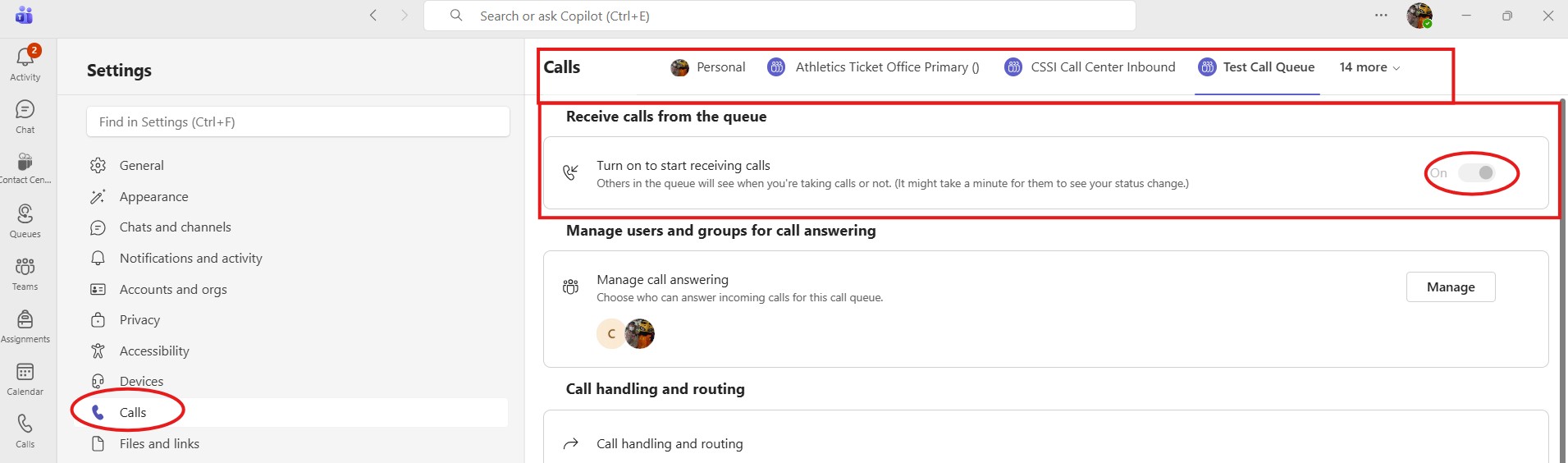
In this example, I'm automatically opted into the queue as this queue's membership automatically signs me into it every time I have the Teams client open. This is why it is greyed out. If yours is not greyed out, you will need to opt in when you need to take queue calls and be sure to opt out when you are aren't supposed to be taking queue calls.
Answering a Call Queue Call
To answer a routed call, click the incoming call notification on your computer screen. The notification will show you which call queue is routing the call.
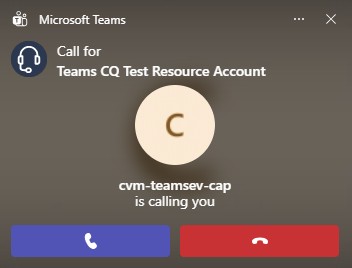
Note how the notification states that is is a call for the call queue where as standard notifications will not have that piece. This is how you can tell if the call is a call queue call or a call made directly to you.
How do I make a call on behalf of a Call Queue?
How do I make a call on behalf of a Call Queue?
Calling on Behalf of a Call Queue
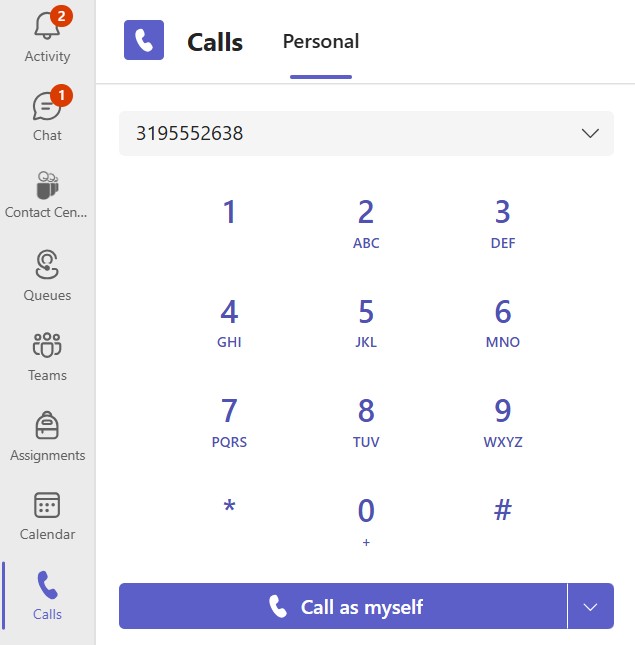
Navigate to the Calls section of Teams. Use the dial pad to dial the ten-digit number you wish to call. You should have a menu next to "Call as myself" this is where you choose the queue you wish to call out as. Something to keep in mind: if you're an agent in multiple queues, you will have multiple options to call out. Be sure you pick the correct queue to call from.
Step 1: Dial Ten-Digit Number
Step 2: use the menu next to "Call as myself" and select to queue you wish to call out as
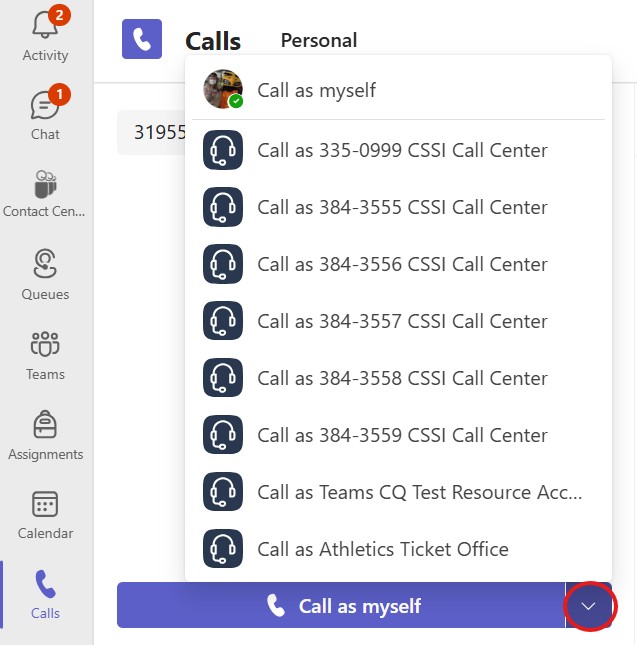
How do I add the email inbox use to house call queue voicemails to Outlook?
How do I add the email inbox use to house call queue voicemails to Outlook?
All voicemails are housed in various departmental emails across departments. Contact your department and/or desktop support staff as to which account houses these voicemails. If they're unsure, they can contact the Unified Communications team and they can find out for you.
As far as adding it to Outlook, that is the same procedure you'd use for any departmental email you want added in Outlook. You can find steps to you using this support article.
How do I change my Call Queue voicemail greeting?
How do I change my Call Queue voicemail greeting?
Changing a Call Queue Voicemail Greeting
The Unified Communications team is currently in charge of these greetings. If updates need to be made to the voicemail message, please send a Halo ticket to them. In an effort to stay ADA compliant as a campus, we are exclusively using text-to-speech for these greetings. Send the script in the ticket and the Unified Communications team can update the voicemail message in your queue.
Problems Calling from a Call Queue
Problems Calling from a Call Queue
If you having trouble calling any number on behalf of a Call Queue, best practices recommends that you try again using your personal number. If you have issues there, you may want to reach out to your desktop support and check if you are still provisioned for Teams Enterprise Voice. If it is a physical VoIP phone having the issue it is advisable to also bring that to the attention of local desktop support for initial troubleshooting.
Problems Answering Calls in a Call Queue
Problems Answering Calls in a Call Queue
There is a 5-6 second delay on our VoIP phones that receive call queue calls. If you are answering calls from the queue via our VoIP phones, that may take some adjusting to get used to. Unfortunately, it is a byproduct of these phones and how the system works.
If you notice calls are dropping randomly, it would be a good practice to restart the machine you're working on. There could be conflicts going on with the machine that are causing your issues. A restart will insure that you're the only one signed into the computer and signed into Teams.
Last updated
Article number
5136